

Data Analytics
SQL Best Practices for Beginners: Write Queries Like a Senior Analyst
By JC de las Alas, Founder and Lead Instructor
· 8 min read
Here is a secret about SQL that tutorials skip: the queries that get analysts promoted are rarely clever. They are correct, readable, and checkable. A senior analyst's query looks almost boring, and that is exactly the point. Whether you are pulling numbers for a Shopee-style store or reporting SLA breaches to a BPO client, these are the habits that make your SQL trustworthy.
1. Format for the next reader (usually future you)
Uppercase your keywords, put each clause on its own line, and use aliases that mean something: c for customers and o for orders, not t1 and t2. Six weeks from now, the person debugging your query at 6 PM before a client call will either thank you or curse you. Write for that person.
2. Stop writing SELECT *
SELECT * is fine while exploring. In anything you save or share, name your columns. It documents intent, keeps reports stable when someone adds a column to the table, and forces you to actually think about what each field means before you use it.
3. Know your grain before you JOIN
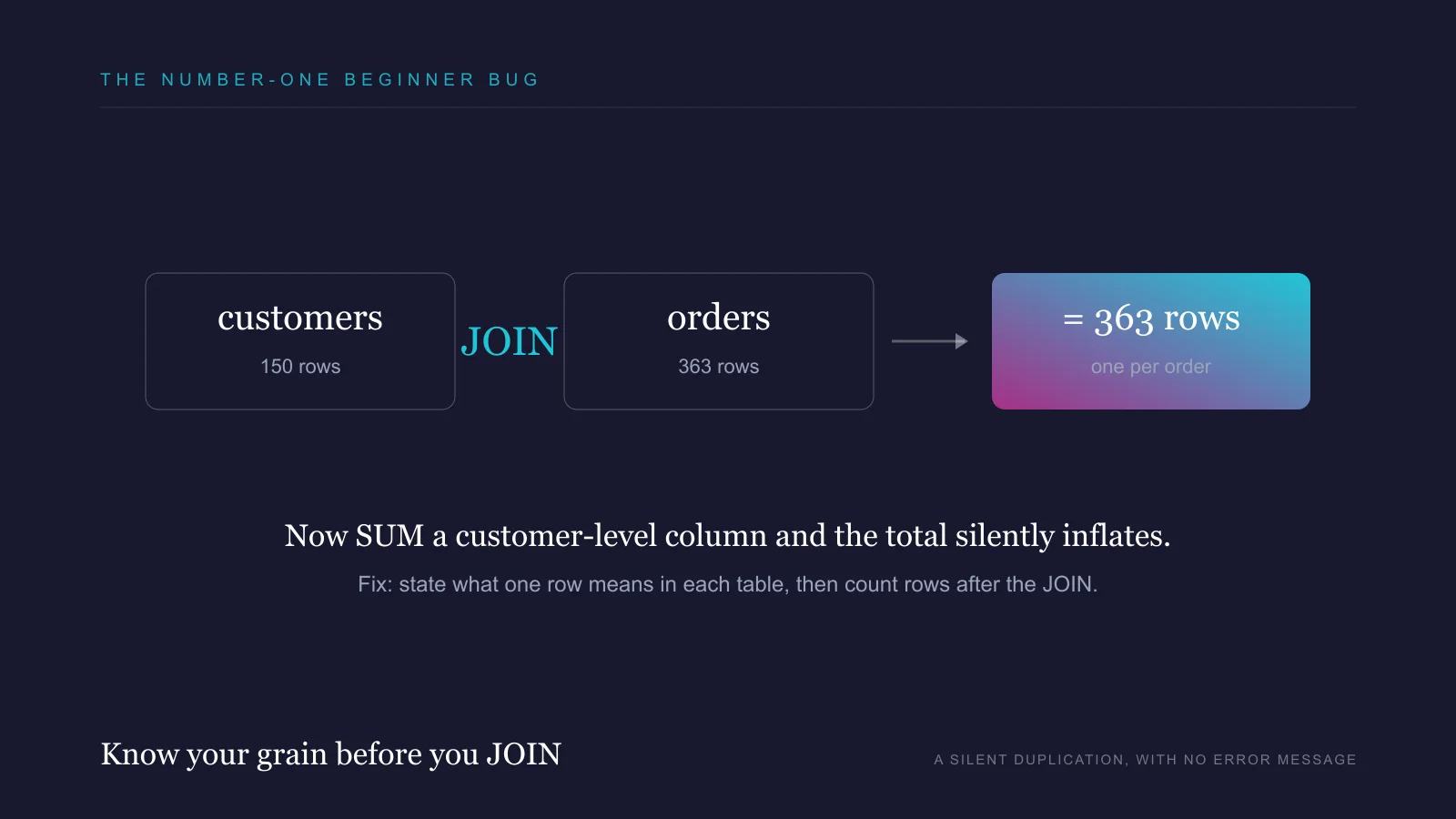
The number one beginner bug is not a syntax error, it is a silent duplication. Join a table of 150 customers to their 363 orders and every customer row multiplies. Sum a customer-level column after that join and your total is inflated, with no error message to save you. Before any JOIN, say out loud what one row means in each table. After the JOIN, count your rows and explain the count. Our free e-commerce orders project is built around exactly this trap.
4. Filter early, and know WHERE from HAVING
WHERE filters rows before grouping; HAVING filters groups after. Repeat buyers are customers HAVING more than one order. May transactions are rows WHERE the date falls in May. Mixing these up either breaks the query or, worse, quietly returns the wrong universe of data.
5. Treat NULL as a decision, not an accident
NULL is not zero and it is not an empty string, and = NULL matches nothing. Every NULL in your data is a business fact waiting for a decision. In our support tickets project, a blank resolved_at means the ticket is still open: include those in a resolution-time average and your SLA report lies to the operations manager. Decide, per query, whether NULLs are excluded, defaulted with COALESCE, or reported as their own category. Then write that decision in a comment.
6. Make every aggregate reconcile
If total revenue is 441,907, then revenue summed by province must also be 441,907. Run the control total first, then slice. When a breakdown does not add up to the whole, you have found a JOIN duplication, a filter mismatch, or NULLs falling out of a GROUP BY. Senior analysts find those before the meeting, not during it.
7. Comment the why, not the what
-- join orders to customers is noise; the code already says that. -- open tickets excluded: no resolved_at yet, counted separately as backlog is gold. Comments exist to carry business decisions, edge cases, and the one weird thing about the data that took you an hour to discover.
8. Sanity-check against reality
Every result should pass a smell test: row counts in the right ballpark, dates inside the expected range, no province called NULL, averages that a human who knows the business would believe. If a coffee-gear store's average order value comes out at 50 pesos, the query is wrong long before the math is. The best analysts distrust their own first result.
9. Save your queries like the assets they are
One question, one saved .sql file, named for the question it answers, with the date and the business context in a comment at the top. Your query library becomes your personal playbook, your fastest interview prep, and eventually your portfolio.
10. Practice on questions, not syntax drills
Syntax sticks when it earns its keep answering a real question. Our two free SQL projects come with importable CSVs, business questions written the way a manager would actually ask them, and expected outputs to verify against: analyze a coffee-gear seller's orders and find the SLA breaches in a telco support queue.
When your queries get slow, go one level deeper
Correctness comes first; speed comes when tables grow. The moment a query crawls, do not guess, read the plan. The official PostgreSQL documentation on using EXPLAIN shows how to see whether your query uses an index or scans the whole table, its chapter on indexes explains when an index helps (and when it just adds overhead), and its performance tips tie it together. These concepts transfer to MySQL, SQL Server, and BigQuery too.
Build the foundation first
If you are still shaky on joins, keys, and grouping, this free full-length course from freeCodeCamp is the canonical starting point, about four hours that take you from zero to writing real queries. Watch it, then come back and apply the ten habits above to make your queries trustworthy, not just working.
Where to go from here
SQL plus Excel is the core of nearly every data analyst job post in the Philippines. The AI-Powered Data Analytics Career Bootcamp teaches both live, then layers on Power BI, Tableau, and AI-assisted workflows, so the queries you write end up on dashboards employers can see.
- #SQL
- #Data Analytics
- #Best Practices
Frequently asked questions
The syntax is one of the friendliest in tech and most learners write useful queries within days. The real learning curve is judgment: understanding table grain, JOIN behavior, and NULL handling. Practicing on realistic business questions builds that judgment fastest.
Any mainstream one. SQLite is the easiest zero-setup start, and PostgreSQL or MySQL are common in Philippine companies. Core SQL transfers across all of them, so pick whichever tool lets you start practicing today.
In most analyst roles, yes. SQL is how you pull and shape data before Excel, Power BI, or Tableau ever see it, and job postings for data analysts in the Philippines list it alongside Excel as a core requirement.
Comfort with SELECT, WHERE, GROUP BY, HAVING, JOINs, aggregate functions, and basic date handling covers the large majority of screening tests. Depth in window functions helps but is usually a plus, not a gate, for entry-level roles.